
AI Chat: Set Up Your Entire Sales System Without Touching the Interface

Every sales platform you have ever used follows the same pattern. Open the dashboard. Click through a maze of menus. Configure filters. Select options from dropdowns. Toggle settings. Save. Go back. Click something else. Repeat for an hour until you finally have a campaign ready to launch.
We built Vendo AI to eliminate exactly that. On March 1, 2026, we are introducing the AI Assistant Chat — a conversational interface that lets you set up your entire sales system, from audience building to campaign launch, without ever clicking through a single menu. Just tell the AI what you want, and it executes.
This is not a chatbot that answers FAQ questions. This is a full-featured command center that understands natural language, searches our 4M+ verified B2B contact database, builds targeted audiences, estimates budgets, and launches multi-channel campaigns — all through conversation.
The Old Way vs. The New Way
Let us paint the picture of what setting up a sales campaign traditionally looks like:
- Log into the platform
- Navigate to the audience builder section
- Select country from a dropdown (scroll through 200+ options)
- Pick an industry from another dropdown
- Set company size range using sliders
- Add keyword filters manually
- Save the audience, name it, assign tags
- Navigate to the campaign builder (different section entirely)
- Select the audience you just built
- Choose outreach channels, configure sequences
- Review, confirm, launch
That is 11 steps across multiple screens, requiring you to know exactly where every setting lives. It works, but it is slow, and it demands that you learn the interface before you can accomplish anything.
Now here is the new way with the AI Assistant Chat:
"Find SaaS companies in the United States with 50 to 200 employees and launch an email campaign."
One sentence. The AI handles everything else: searching the database, building the audience, filtering results, calculating the budget, and launching the campaign. That is what we mean by setup without the interface.
What Is the AI Assistant Chat
The AI Assistant Chat is an intelligent helper built directly into the Vendo AI platform. Think of it as a senior sales operations specialist who knows your entire system inside and out and can execute any operation instantly — except it never sleeps, never forgets, and responds in seconds.
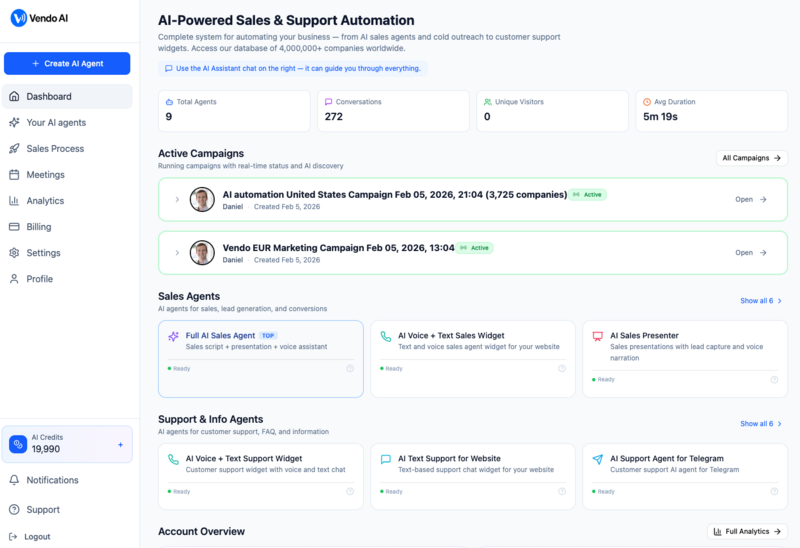
The chat lives inside your Vendo AI dashboard. Open it, describe what you need in plain English, and the AI takes action. It is not a search bar. It is not a filter panel with a text input. It is a genuine conversational interface that understands context, remembers your previous messages within the session, and executes complex multi-step operations through simple dialogue.
Key principle: Everything you can do through the traditional Vendo AI interface, you can now do through conversation. Find audiences, filter results, review channel availability, estimate budgets, and launch campaigns — all without navigating a single menu.
Building Your Perfect Audience Through Conversation
The core power of the AI Assistant Chat is audience building. Vendo AI has over 4 million verified B2B company profiles in its database, and the chat gives you instant, conversational access to all of them.
Step 1: Describe Your Target Audience
You start by simply describing who you want to reach. No forms, no filters — just natural language:
- "Find marketing agencies in London"
- "Show me tech startups in San Francisco focused on AI"
- "I need consulting firms in Germany with more than 100 employees"
- "Find companies using Salesforce in California"
The AI parses your request, understands the intent, and searches the comprehensive database for matching companies.
Step 2: Review Structured Results
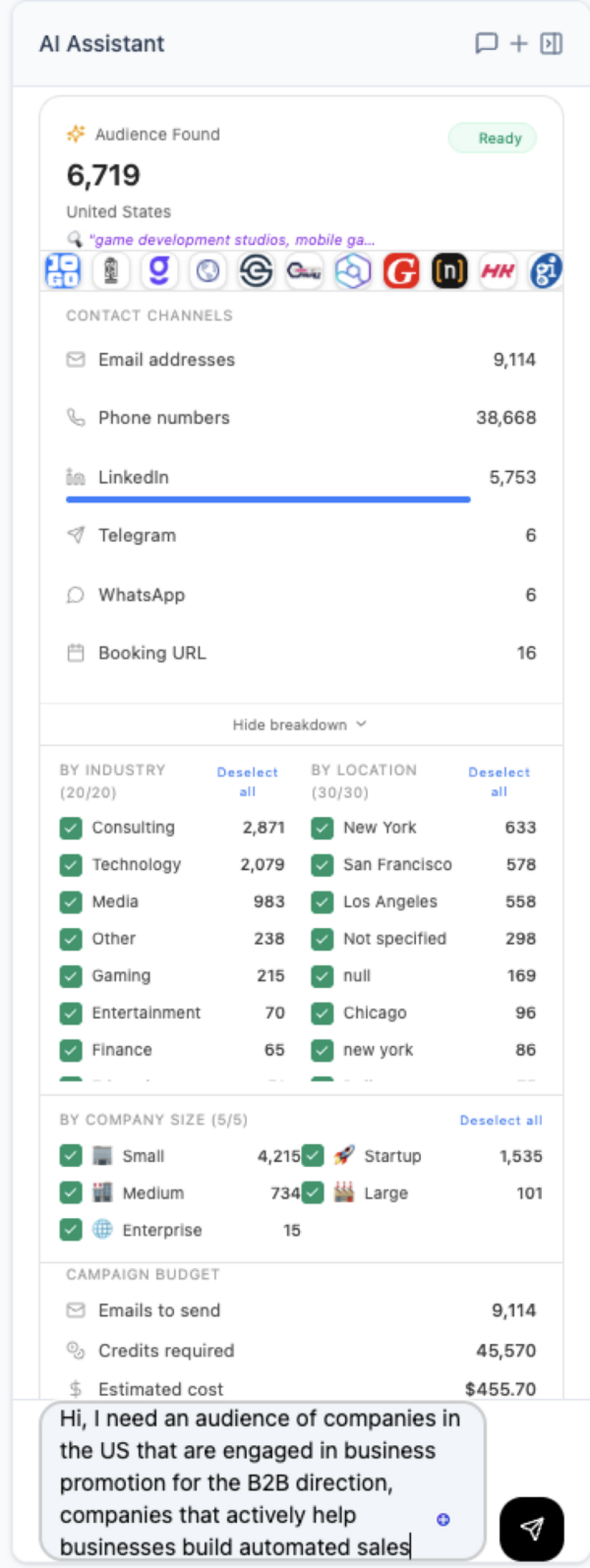
Within seconds, the AI returns a detailed breakdown of what it found. This is not just a number — it is a complete audience profile:
For every search, the AI shows you:
- Total Audience Found — the number of companies matching your criteria
- Contact Channels Available — email, phone, LinkedIn, Telegram, WhatsApp, and Booking URLs
- Industry Breakdown — how the audience distributes across industries
- Location Breakdown — geographic distribution of matched companies
- Company Size Distribution — small, mid-size, and enterprise breakdown
- Campaign Budget Estimate — how many credits you will need to reach this audience
All of this appears right in the chat interface. You can review, ask questions, and refine — all in the same conversation thread.
Three Ways to Search: Choose Your Precision Level
Not every search is the same. Sometimes you want a broad sweep of a market. Other times you need surgical precision. The AI Assistant Chat offers three distinct search modes, each optimized for a different use case.
1. Keyword Search — Fast and Broad
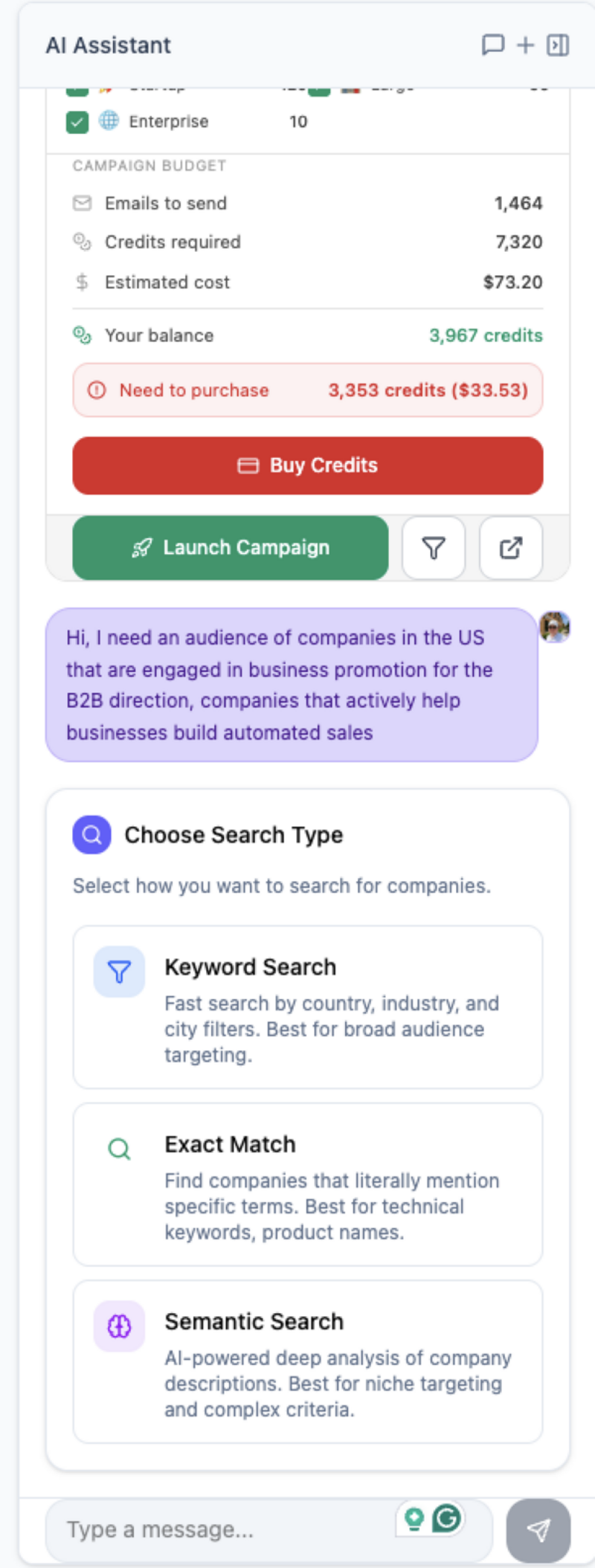
Keyword Search is the fastest way to build an audience. It uses structured filters — country, industry, city, company size — to quickly identify matching companies in the database. Think of it as the equivalent of filling out a filter form, except you do it by talking.
Best for: Broad market targeting where you want maximum reach. "Show me all IT companies in the United States" or "Find marketing agencies in Europe."
How it works: The AI extracts keywords from your description and applies them as database filters. Country, industry, and location are matched against structured fields, so results are fast and comprehensive.
2. Exact Match — Precise and Literal
Exact Match searches for specific terms as they literally appear in company descriptions, profiles, and metadata. There is no interpretation — the AI looks for the exact text you specify.
Best for: Technical keywords, product names, certifications, and specific tools. "Find companies that mention Kubernetes in their profile" or "Show me businesses with ISO 27001 certification."
How it works: The search term is matched verbatim against company descriptions, product listings, and service pages. If a company has the exact phrase somewhere in their data, it appears in results.
3. Semantic Search — AI-Powered Deep Understanding
Semantic Search is where the AI truly shines. Instead of matching keywords, it understands the meaning and context of your request. It can find companies based on what they do, the problems they solve, or the needs they have — even when those companies never use the exact words you searched for.
Best for: Niche targeting, complex criteria, and finding companies by their problems rather than their labels. "Find companies struggling with customer churn in the subscription economy" or "Show me businesses that need to modernize their legacy IT infrastructure."
How it works: The AI converts your query into a semantic vector and matches it against enriched company profiles. A company that describes itself as "helping SaaS businesses retain users" would match a search for "customer churn solutions" — even without using the word "churn" anywhere.
| Search Type | Speed | Precision | Best Use Case |
|---|---|---|---|
| Keyword Search | Fastest | Broad | Geographic and industry targeting |
| Exact Match | Fast | Literal | Technical terms, product names, certifications |
| Semantic Search | Moderate | Deep | Niche audiences, problem-based targeting |
You can switch between search types within the same conversation. Start with a broad keyword search to gauge market size, then drill down with semantic search to find the most relevant subset. The AI remembers your context throughout.
The Power of Conversational Refinement
Here is where the chat interface fundamentally changes how you work. In a traditional interface, refining your audience means going back to the filter panel, adjusting dropdowns, and re-running the search. In the AI Assistant Chat, you simply keep talking.
Imagine this conversation flow:
- You: "Show me tech companies in Germany"
- AI: Returns 4,200 companies with full breakdown
- You: "Now filter to only startups with fewer than 50 employees"
- AI: Narrows to 1,850 companies, updates breakdown
- You: "Remove gaming companies"
- AI: Excludes gaming industry, 1,720 companies remain
- You: "What would it cost to launch an email campaign to this audience?"
- AI: Calculates budget: 1,720 credits for full coverage
- You: "Launch it"
- AI: Campaign created and launched
Five refinements and a campaign launch — all through natural conversation. The AI is context-aware: it remembers every previous query in the session. When you say "now filter to startups," it knows you mean the German tech companies from your previous message. There is no need to repeat criteria or start over.
"The best interface is no interface. The AI Assistant Chat removes the gap between what you want and what happens. Describe the outcome, and the system delivers it."
This conversational refinement is especially powerful for complex targeting. You can start with a broad hypothesis, explore the data the AI returns, spot patterns in the industry and location breakdowns, and iteratively narrow your audience until it precisely matches your ideal customer profile.
From Chat to Campaign in Minutes
The AI Assistant Chat is not just a search tool. It is a complete campaign launcher. Once you have built and refined your audience through conversation, going live takes one more sentence.
The Complete Workflow
- Open Chat — click the AI Assistant in your Vendo AI dashboard
- Describe Target Audience — tell the AI who you want to reach, in your own words
- Choose Search Type — Keyword, Exact Match, or Semantic (or let the AI recommend one)
- Review and Filter — examine the results, refine through conversation
- Check Budget — ask the AI how many credits the campaign will require
- Launch Campaign — say "launch" and the campaign goes live
The AI handles multi-channel orchestration automatically. The same audience can receive email outreach, LinkedIn connection requests, and voice calls — all coordinated by the AI to maximize engagement without overwhelming prospects.
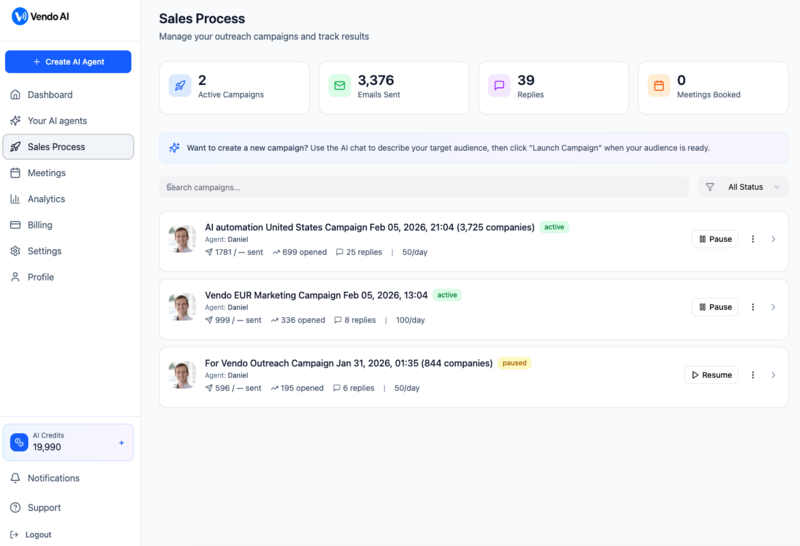
No forms to fill out. No dropdown menus to navigate. No configuration screens to learn. The entire journey from "I need customers" to "campaign is running" happens in a single chat window.
Real-World Example Workflows
To show just how practical this is, here are two complete workflows that our early users have run through the AI Assistant Chat.
Workflow 1: CRM Software Targeting Consulting Firms
A client who sells CRM software wanted to reach mid-size consulting firms across Europe. Here is exactly how the conversation went:
- Prompt: "I sell CRM software. Find mid-size consulting firms in Europe with 50 to 500 employees"
- AI result: 2,340 companies found across 18 countries, with Germany (410), UK (380), and France (290) as top markets
- Refinement: "Focus on Germany and the UK only"
- Updated result: 790 companies, 85% have verified email contacts, 62% have LinkedIn profiles
- Budget check: "What would a multi-channel campaign cost?"
- AI response: 790 credits for email, estimated 490 credits for LinkedIn outreach, total 1,280 credits
- Launch: "Launch the email campaign first"
- Result: Campaign created, first emails scheduled for delivery within 24 hours
Total time from first message to campaign launch: under 4 minutes. Using the traditional interface with manual filtering, the same setup would take 20-30 minutes.
Workflow 2: Finding Salesforce Users in California
A different client wanted to target companies already using Salesforce — a perfect case for Exact Match search:
- Prompt: "Find companies using Salesforce in California" (selected Exact Match)
- AI result: 523 companies identified with "Salesforce" in their technology stack or company profile
- Review: "Show me the industry breakdown"
- AI response: Technology (180), Financial Services (95), Healthcare (72), Professional Services (68), Retail (48), Other (60)
- Filter: "Only Technology and Financial Services"
- Updated result: 275 companies with high contact coverage
- Action: "Launch an email campaign to this audience"
- Result: Campaign launched with 275 targeted contacts
The Exact Match mode caught companies that specifically mention Salesforce in their profiles — not companies that are vaguely related to CRM or enterprise software, but businesses that literally use the product. That level of precision is the difference between a 5% reply rate and a 0.5% reply rate.
Why Conversational AI Beats Traditional Interfaces
This is not just about convenience. The conversational approach fundamentally changes the quality of campaign setup for three important reasons:
1. Lower Barrier to Entry
New users do not need to learn the platform. There are no tutorials to watch, no documentation to read. If you can describe your ideal customer in English, you can build and launch a campaign. The AI handles all the technical translation between your intent and the system's capabilities.
2. Faster Iteration
In traditional interfaces, every change requires navigating back to a filter panel, adjusting settings, and re-running queries. In conversation, each refinement is a single sentence. You can test 10 different audience variations in the time it takes to configure one through a form.
3. Better Targeting Through Exploration
When the AI returns results with full industry, location, and size breakdowns, patterns emerge that you would not have discovered through manual filtering. A user searching for "tech companies in Europe" might discover that the Netherlands has an unexpectedly high concentration of their ideal customer profile — an insight that would be invisible behind a country dropdown.
The result: Users who set up campaigns through the AI Assistant Chat report 3x faster campaign setup and consistently build more precisely targeted audiences compared to using traditional filter-based interfaces.
What Is Coming Next
The AI Assistant Chat today handles audience building, search, filtering, budget estimation, and campaign launching. But this is just the beginning. Our roadmap for the conversational interface includes:
- Agent Creation — create and configure AI sales agents through conversation: "Create a voice agent that speaks German and specializes in SaaS products"
- Campaign Management — pause, adjust, and optimize running campaigns: "Pause the Germany campaign and increase the budget for the UK one"
- Live Analytics — ask about performance in real time: "What is the open rate on my latest email campaign?" or "Which campaign has the most replies this week?"
- Multi-Campaign Orchestration — manage complex, multi-step sequences across audiences: "Contacts who opened but did not reply to the email — send them a LinkedIn connection request"
- Natural Language Reporting — generate reports through conversation: "Give me a summary of all campaign performance for February"
The vision is clear: the AI Assistant Chat becomes the primary way you interact with Vendo AI. Not a shortcut, not an alternative — the main interface. Every feature, every configuration, every data point accessible through natural language.
We believe the future of B2B sales software is not about building more buttons and dashboards. It is about building intelligence that understands what you need and delivers it instantly. The AI Assistant Chat is our first major step in that direction.
Try It Today
The AI Assistant Chat is available now for all Vendo AI users. Open your dashboard, click the chat icon, and start describing your ideal customer. In minutes, you will have a targeted audience and a live campaign — all built through conversation.
No menus. No forms. No learning curve. Just tell the AI what you want.
Try the AI Assistant Chat now
Build your audience and launch campaigns through conversation. No interface needed.
Start Free Trial