
9 Tools for Your AI Agent
Your AI agent is a fully trained salesperson who knows everything about your business. Connections are its tools — widget, phone, meetings, messengers, presentations. Just like a human, but available 24/7 in 145+ languages.
Create Your AgentThe Agent Is the Brain. Connections Are the Hands.
Think of your AI Sales Agent as a deeply trained employee. It has absorbed your entire business — your products, pricing, competitive advantages, case studies, and target audience. It understands your offer the way your best salesperson does.
But an employee needs tools to do their job. A phone to make calls. A laptop for meetings. A messaging app for quick conversations. That's what connections are — the channels and interfaces through which your agent interacts with the world.
Each agent can have multiple connections simultaneously. One agent can answer calls, chat on your website, present in Google Meet meetings, and respond on WhatsApp — all at once, all with the same deep knowledge of your business.
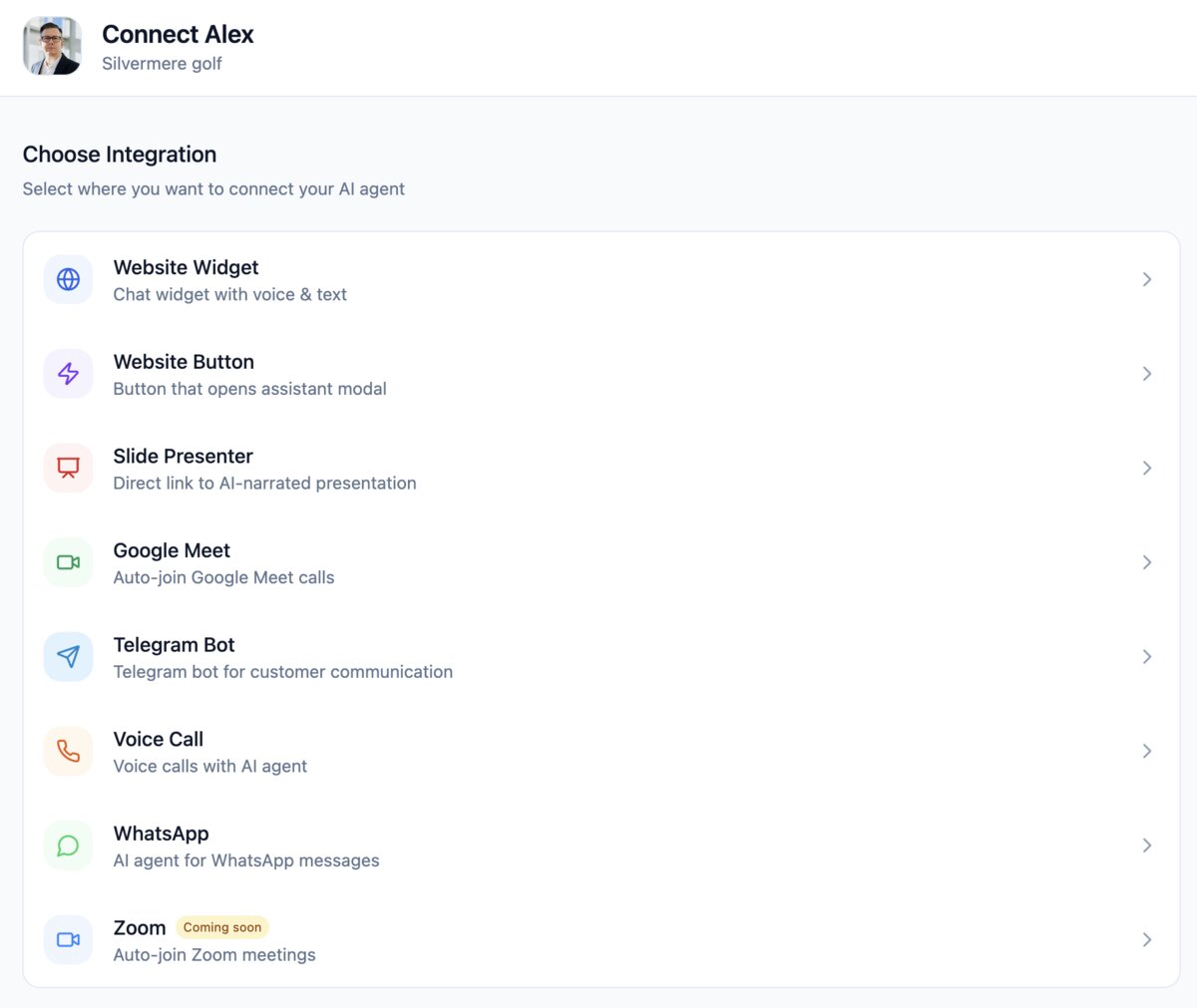
All Available Connections
Each connection gives your AI agent a new way to reach and engage with prospects and customers. Mix and match to create the perfect multi-channel presence.
Website WidgetLive
Embed a voice + text chat widget directly on your website. Your AI agent greets visitors, answers questions in real time, qualifies leads, and hands off to a human when needed. Fully customizable appearance to match your brand.
- Voice + text modes
- Embeds with one line of code
- Human handoff capability
Website ButtonLive
A clickable button on your website that opens an AI assistant modal. Perfect for specific pages — pricing pages, product pages, or landing pages where visitors need instant answers about your offer.
- Place on any page element
- Opens full-screen assistant
- Custom button styling
Slide PresenterLive
AI-generated interactive slide presentations with synchronized voice narration. Share a direct link and your agent presents your product — answering questions in real-time and adapting the flow based on viewer engagement.
- AI voice narration
- Real-time Q&A during presentation
- Shareable link — no software needed
Google MeetLive
Your AI agent auto-joins Google Meet calls as a participant. It presents your product with slides and voice, answers questions live, handles objections, and can operate fully autonomously or alongside a human co-presenter.
- Auto-join scheduled meetings
- Slide presentations with voice
- Solo or co-presenter mode
Telegram BotLive
Connect your agent as a Telegram bot. Customers message the bot and get instant, intelligent responses — product information, pricing details, scheduling, support — all powered by your agent's deep knowledge of your business.
- Instant automated responses
- Rich media & document sharing
- 24/7 availability
Voice CallLive
Natural-sounding AI voice calls in 145+ languages. Your agent makes and receives phone calls, handles objections in real time, schedules meetings, and records every conversation with full transcripts. Not a robocall — a genuine conversation.
- 145+ languages, native pronunciation
- Real-time objection handling
- Recording + transcripts
WhatsAppLive
Your AI agent on WhatsApp Business — the world's most popular messenger. Instant responses, lead qualification, appointment scheduling, document sharing, and full sales conversations. Prospects message your number and get a knowledgeable agent 24/7.
- WhatsApp Business integration
- Lead qualification & scheduling
- Document & media sharing
Zoom Coming Soon
Auto-join Zoom meetings with the same capabilities as Google Meet — slide presentations, voice narration, real-time Q&A, and autonomous or co-presenter modes. Full Zoom integration is in final development.
- Auto-join Zoom meetings
- Same features as Google Meet
- In final development
Connect in 3 Steps
Adding a connection to your agent takes minutes, not days. No coding required for most channels.
Create Your Agent
Start by creating an AI agent — provide your website URL or upload documents, choose a voice and personality. The AI learns your business automatically in minutes.
Choose Connections
Select which channels you want to activate. Widget for your website? Voice calls for outbound? Telegram for customer support? Each agent can have multiple connections active simultaneously.
Go Live Instantly
Most connections activate instantly — copy the widget code, connect your Telegram bot, link your WhatsApp Business. Your agent is immediately available across all chosen channels with full knowledge of your business.
Credit Usage by Channel
All channels use the same credit-based system. Pay only for what you use.
| Connection Type | Credits |
|---|---|
| Website Widget (text message) | 1 credit |
| Website Button (text message) | 1 credit |
| Voice Call | 14 credits/min |
| AI Presentation | 17 credits/min |
| Google Meet / Zoom | 17 credits/min |
| Telegram message | 1 credit |
| WhatsApp message | 1 credit |
Frequently Asked Questions
Give Your AI Agent the Right Tools
Create an agent that knows your business inside out, then connect it everywhere your customers are — website, phone, messengers, meetings.
Create Your AgentNo credit card required · Setup in under 10 minutes · From $99/month